Listening Stats
See what you
actually play
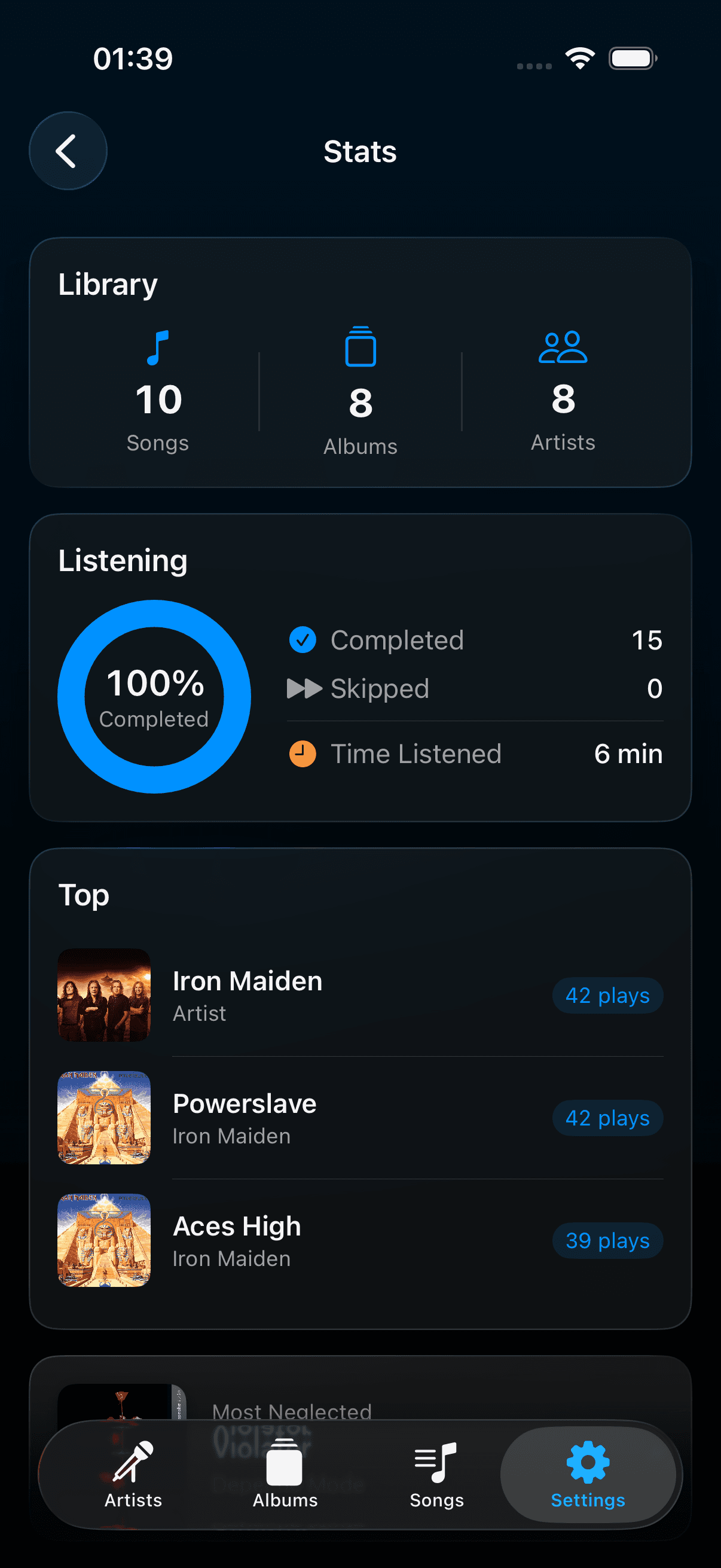
Top artists, top albums, most-skipped tracks — and a neglected album card that surfaces records you forgot you owned. Nothing synced to a server; every count stays on your device.
How Listening Stats works
Tracked per track, album, and artist
Play counts, skip counts, and listening time are recorded at every level of your library, building up top-artist and top-album rankings over time.
Surfaces what you've neglected
A neglected-album card highlights records you own but haven't played in a long time — a direct way to work a forgotten corner of your library back into rotation.
Stays on-device
Stats power the Stats tab and give AI DJ the listening context it needs to weight suggestions. They're never uploaded anywhere, and Device Sync deliberately leaves them out — each device keeps its own.
Questions about Listening Stats
Does Plinth track what I listen to?+
Yes, locally. Plinth records play counts, skip counts, and listening time per track, album, and artist. This data stays on your device and is used only to power the Stats tab and to give the AI DJ context. It is never uploaded anywhere.
Is my listening data ever uploaded anywhere?+
No. Stats stay in local storage on your device. They're never uploaded to a server, and Device Sync deliberately excludes them — each device keeps its own counts even after pairing.
Do I need an account to see my stats?+
No. Plinth has no account system at all — stats are tied to the music library on your device, not to a login.