Research Mode
Rediscover your library,
15 seconds at a time
Research Mode jumps to the midpoint of each track, plays 15 seconds, then auto-advances. It's the fastest way to work through records you imported years ago and never really heard.
How Research Mode works
Jumps to the midpoint
Instead of starting at the first second, Research Mode seeks to the middle of each track — past the intro, where a song's character usually shows up fastest.
Plays 15 seconds
Just enough to place a song and decide whether it belongs on a real playlist, without committing to a full listen.
Auto-advances through the queue
After 15 seconds, Plinth moves to the next track on its own — no tapping required to keep moving through hundreds of albums.
One tap to switch into it
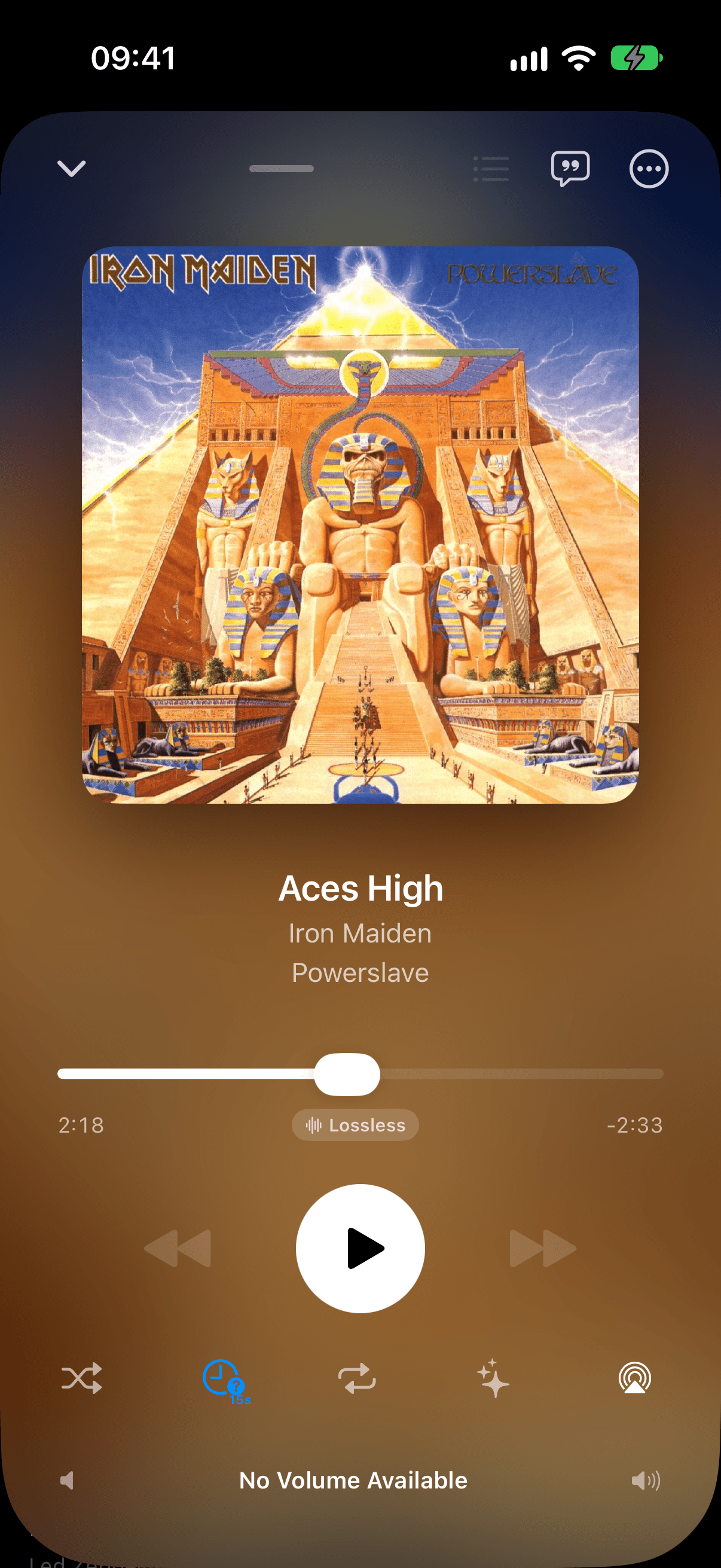
Tap the dedicated stopwatch button in Now Playing to turn it on — or flip the Research Mode toggle in Settings → Playback. It's built for working through a large library fast.
Questions about Research Mode
Can I combine Research Mode with Shuffle?+
No. Turning on Research Mode from its stopwatch button replaces whatever playback mode was active, including Shuffle — each mode decides what comes up next its own way, so they don't layer on top of each other.
Does Research Mode work in CarPlay?+
Yes. Every playback mode, including Research Mode, is available from the Now Playing controls on your CarPlay dashboard, exactly as it is on your phone.
How do I turn it off?+
Tap the stopwatch button in Now Playing again, or flip off the Research Mode toggle in Settings → Playback. Either way you're straight back to normal playback.